拓扑图
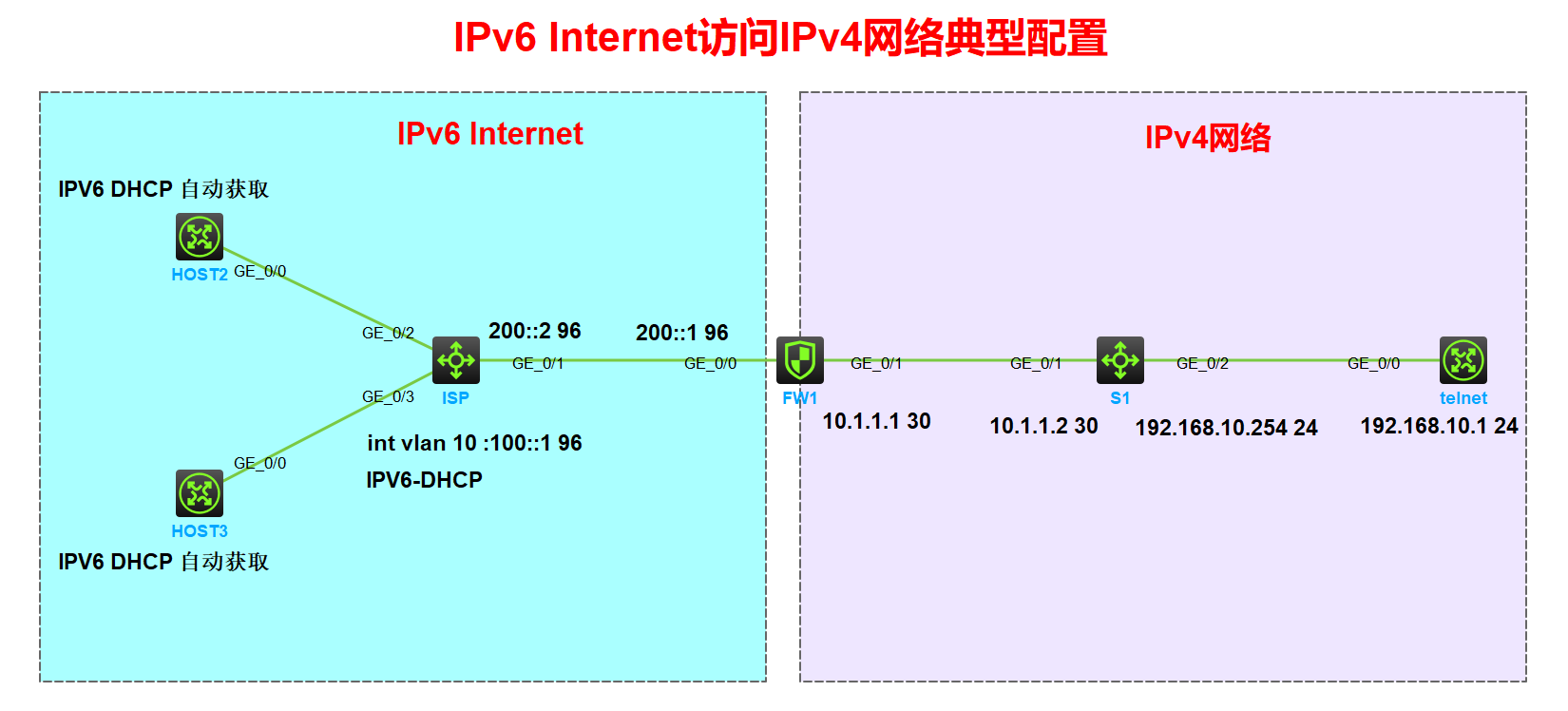
说明:isp 为公网设备部署 ipv6 dhcp 为 host1、host2 分配 ipv6 地址。FW1 左侧公网为IPV6网络;右侧为内网为IPV4网络
要求:IPV4地址范围中的telnet设备配置 telnet 服务为公网上的host1、host2 提供远程访问
实验步骤
1.接口加入安全域
[FW1] security-zone name Trust
[FW1-security-zone-Trust] import interface GigabitEthernet1/0/1
[FW1-security-zone-DMZ]security-zone name Untrust
[FW1-security-zone-Untrust] import interface GigabitEthernet1/0/0
2.配置安全策略
[FW1]security-policy ip
[FW1-security-policy-ip] rule 1 name aft-v4
[FW1-security-policy-ip-1-aft-v4] action pass
[FW1-security-policy-ip-1-aft-v4] source-zone Local
[FW1-security-policy-ip-1-aft-v4] destination-zone Trust
[FW1-security-policy-ip-1-aft-v4] source-ip-host 10.1.1.1
[FW1-security-policy-ip-1-aft-v4] destination-ip-host 192.168.10.1
[FW1]security-policy ipv6
[FW1-security-policy-ipv6] rule 1 name aft-ipv6
[FW1-security-policy-ipv6-1-aft-ipv6] action pass
[FW1-security-policy-ipv6-1-aft-ipv6] source-zone Untrust
[FW1-security-policy-ipv6-1-aft-ipv6] destination-zone Local
[FW1-security-policy-ipv6-1-aft-ipv6] source-ip-host 100::2
[FW1-security-policy-ipv6-1-aft-ipv6] destination-ip-host 220::C0A8:A01
3.基础配置(配置IP地址,配置路由,配置IPV6-DHCP,telnet配置)
(1)IP地址配置
[host2]interface GigabitEthernet0/0
[host2-GigabitEthernet0/0] ipv6 address dhcp-alloc
[host3]interface GigabitEthernet0/0
[host3-GigabitEthernet0/0] ipv6 address dhcp-alloc
[ISP]vlan 10
[ISP-vlan10]port g1/0/2 to g1/0/3
[ISP]interface Vlan-interface1
[ISP-Vlan-interface1] ipv6 address 200::2/96
[ISP-Vlan-interface1]interface Vlan-interface10
[ISP-Vlan-interface10] ipv6 address 100::1/96
[FW1]interface GigabitEthernet1/0/0
[FW1-GigabitEthernet1/0/0] ipv6 address 200::1/96
[FW1-GigabitEthernet1/0/0]interface GigabitEthernet1/0/1
[FW1-GigabitEthernet1/0/1] ip address 10.1.1.1 255.255.255.252
[S1]interface Vlan-interface1
[S1-Vlan-interface1] ip address 192.168.10.254 255.255.255.0
[S1]interface GigabitEthernet1/0/1
[S1-GigabitEthernet1/0/1] ip address 10.1.1.2 255.255.255.252
[telnet]interface GigabitEthernet0/0
[telnet-GigabitEthernet0/0] ip address 192.168.10.1 255.255.255.0
[telnet] telnet server enable
[telnet] line vty 0 10
[telnet-line-vty0-10] authentication-mode scheme
[telnet-line-vty0-10] qu
[telnet] local-user fk
[telnet-luser-manage-fk] password simple 11111111qq
[telnet-luser-manage-fk] authorization-attribute user-role level-15
[telnet-luser-manage-fk] service-type telnet
(2)路由配置
[ISP] ipv6 route-static 220:: 96 200::1
[FW1] ipv6 route-static :: 0 200::2
[FW1] ip route-static 192.168.10.0 24 10.1.1.2
[S1] ip route-static 0.0.0.0 0 10.1.1.1
[telnet] ip route-static 0.0.0.0 0 192.168.10.254
(3)IPV6-DHCP配置
[ISP]ipv6 dhcp pool 100
[ISP-dhcp6-pool-100] network 100::/96
[ISP]interface Vlan-interface10
[ISP-Vlan-interface10] ipv6 dhcp select server
[ISP-Vlan-interface10] ipv6 nd autoconfig managed-address-flag
[ISP-Vlan-interface10] ipv6 nd autoconfig other-flag
[ISP-Vlan-interface10] undo ipv6 nd ra halt
4.AFT 配置
[FW1]acl ipv6 basic 2000
[FW1-acl-ipv6-basic-2000]rule 0 permit source 100::/96 配置哪些公网上的IPV6地址允许变为IPV4
[FW1]aft address-group 1
[FW1-aft-address-group-1] address 10.1.1.1 10.1.1.1 配置被转换后的IPV4地址池
[FW1] aft v6tov4 source acl ipv6 number 2000 address-group 1 配置IPV6和IPV4的源地址转换对应的动态策略
[FW1] aft prefix-nat64 220:: 96 配置 AFT 触发的条件 注意:General前缀与NAT64前缀都不能与设备上的接口地址同网段
[FW1] aft v4tov6 source 192.168.10.1 210::1 配置服务器地址 192.168.10.1 和 ipv6 地址做映射
[FW1]int ra g1/0/0 g1/0/1
[FW1-if-range] aft enable
5.HOST2 上测试
<host2>telnet ipv6 220::192.168.10.1
Trying 220::C0A8:A01 ...
Press CTRL+K to abort
Connected to 220::C0A8:A01 ...
******************************************************************************
* Copyright (c) 2004-2021 New H3C Technologies Co., Ltd. All rights reserved.*
* Without the owner's prior written consent, *
* no decompiling or reverse-engineering shall be allowed. *
******************************************************************************
Login: fk
Password:
<telnet>
查看 AFT 会话
[FW1]DIS AFT session ipv4
Slot 1:
Initiator:
Source IP/port: 10.1.1.1/1024
Destination IP/port: 192.168.10.1/23
DS-Lite tunnel peer: -
VPN instance/VLAN ID/Inline ID: -/-/-
Protocol: TCP(6)
Inbound interface: GigabitEthernet1/0/0
Source security zone: Local
Total sessions found: 1
[FW1]DIS AFT session ipv4 ve
[FW1]DIS AFT session ipv4 verbose
Slot 1:
Initiator:
Source IP/port: 10.1.1.1/1024
Destination IP/port: 192.168.10.1/23
DS-Lite tunnel peer: -
VPN instance/VLAN ID/Inline ID: -/-/-
Protocol: TCP(6)
Inbound interface: GigabitEthernet1/0/0
Source security zone: Local
Responder:
Source IP/port: 192.168.10.1/23
Destination IP/port: 10.1.1.1/1024
DS-Lite tunnel peer: -
VPN instance/VLAN ID/Inline ID: -/-/-
Protocol: TCP(6)
Inbound interface: GigabitEthernet1/0/1
Source security zone: Trust
State: TCP_ESTABLISHED
Application: TELNET
Rule ID: 1
Rule name: aft-v4
Start time: 2023-12-21 21:08:38 TTL: 1186s
Initiator->Responder: 0 packets 0 bytes
Responder->Initiator: 0 packets 0 bytes
Total sessions found: 1
[FW1]DIS AFT session ipv6 verbose
Slot 1:
Initiator:
Source IP/port: 100::2/17473
Destination IP/port: 220::C0A8:A01/23
VPN instance/VLAN ID/Inline ID: -/-/-
Protocol: TCP(6)
Inbound interface: GigabitEthernet1/0/0
Source security zone: Untrust
Responder:
Source IP/port: 220::C0A8:A01/23
Destination IP/port: 100::2/17473
VPN instance/VLAN ID/Inline ID: -/-/-
Protocol: TCP(6)
Inbound interface: GigabitEthernet1/0/1
Source security zone: Local
State: TCP_ESTABLISHED
Application: TELNET
Rule ID: -/-/-
Rule name:
Start time: 2023-12-21 21:08:38 TTL: 1177s
Initiator->Responder: 0 packets 0 bytes
Responder->Initiator: 0 packets 0 bytes
Total sessions found: 1